Copy-paste prompts for underwriting, claims, compliance, and operations teamsWorks with ChatGPT, Claude & Gemini
A note from our team
It's not the tool. It's how your team is talking to it.
The gap between a mediocre AI output and a genuinely useful one is rarely about the model. It’s about specific patterns in how insurance professionals communicate with AI, patterns that are invisible until someone points them out, and easy to fix once they do.
A single structural change to a claims prompt can turn a generic paragraph into a step-by-step coverage analysis with an auditable reasoning trail.
The same adjustment applied to an underwriting submission can eliminate ten minutes of manual data entry on every file.The eight techniques in this playbook each target one or more of these failure patterns directly. They are not tips — they are structural changes to how you communicate with AI that produce consistently better, more reliable results across underwriting, claims, compliance and operations.
This playbook explains how to get significantly better results from AI in insurance workflows by changing how prompts are structured, not the tools themselves.
It includes:
- 8 prompting techniques
- 20+ ready-to-use prompts
- Real insurance use cases (underwriting, claims, compliance)
1. Role-framing | Give AI a job title
Assign a professional role before you assign a task — it changes everything about the output.
Useful for:
- Underwriting triage
- Claims analysis
- Coverage review
- Compliance drafting
The principle
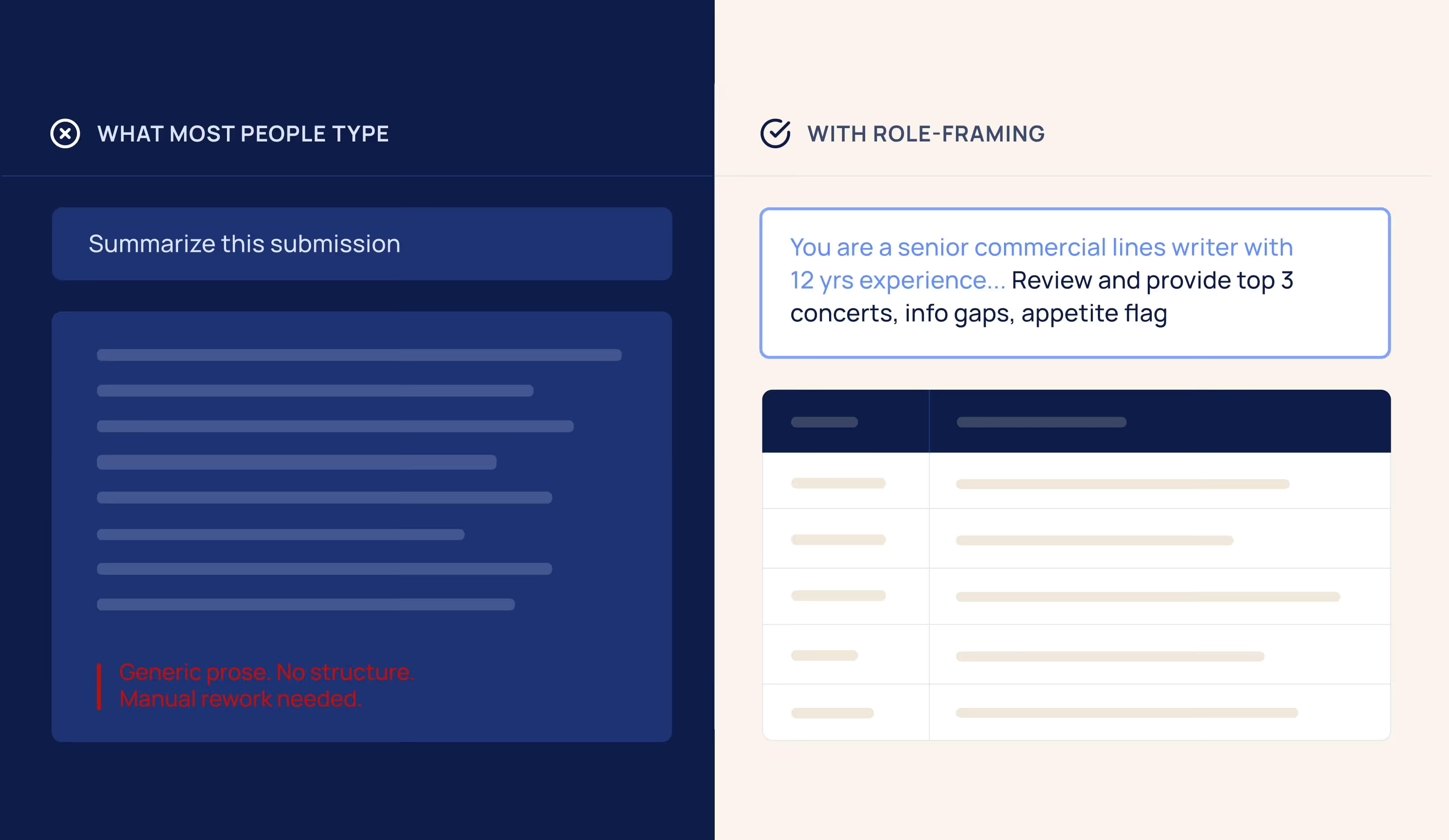
When you open a blank AI window and start typing, the model defaults to 'helpful generalist' mode—articulate, plausible, and completely average for your purposes. The fix takes 15 seconds: start every prompt with a real professional role statement. Not 'you are an AI assistant'—a specific job title, experience level, specialization, and context.
This single change produces outputs that use proper industry terminology, demonstrate domain-specific judgment, and are calibrated to the professional standard your work requires.
Why it matters for insurance
Insurance is domain-specific. The difference between a generic analysis and a genuinely useful one is whether the AI reasons from general knowledge or from real insurance expertise. A role-framed underwriting prompt produces outputs that reference loss ratio logic, schedule credits, and risk appetite language. A claims prompt activates coverage form knowledge, exclusion analysis, and the habit of flagging rather than concluding.
Prompt - Underwriting triage
You are a senior commercial lines underwriter with 12 years of experience at a regional P&C carrier. You specialize in small-to-mid-market accounts across manufacturing, habitational, and contractor classes.
Review the broker submission below and provide:
- The top 3 underwriting concerns—be specific, not generic
- Information gaps that must be resolved before you can quote
- Preliminary appetite flag: Acceptable / Proceed with Caution / Likely Decline with a 2-sentence rationale
- Use underwriting terminology. Do not summarize—analyze.
✓ What you get vs. a vague prompt
Specific flags like subcontractor cost percentage not disclosed—critical for GL rating.Appetite language consistent with how your team talks. A clear recommended next step
Both prompts for this technique are in the Prompt library at the end of this ebook →
EasySend tip
Build a role library for your team: 4–5 pre-written role statements for your mostcommon tasks—underwriting, claims, compliance, agent comms. Store in ashared doc. Anyone grabs the right role and pastes it in. 30 minutes to build,hours saved every week.
2. Structured output prompting | Tell AI how to deliver the answer
Stop reading AI outputs. Start using them directly.
Useful for:
- Submission intake
- Loss run processing
- Claims data
- Policy comparison
The principle
By default, AI writes prose. Prose requires a human to read it, pull out the relevant pieces, and manually enter them somewhere. In high-volume insurance operations, that step quietly destroys the efficiency gain you were hoping for.
Structured output prompting tells AI exactly what format to return data in: a table with specific column names, a numbered list with defined fields, a checklist. The output comes back ready to use—paste directly into your system, hand to the next workflow step, or compare against a template.
Why it matters for insurance
For carriers where data arrives in every possible format—broker emails, PDFsubmissions, scanned applications—there is a constant data normalizationbottleneck. When AI can extract and structure that data on demand, you haveeliminated one of the most labor-intensive steps in your intake workflow.
Prompt - Broker email to structured submission table
You are a commercial lines intake specialist. Extract all relevant submission data from thebroker email below and return as a two-column table: Field | Value.
Required fields:
- Named insured and DBA (if any)
- FEIN (if provided)
- Primary state of operations
- Description of operations
- Annual gross revenue
- Number of full-time / part-time employees
- Lines of business requested
- Requested effective date
- Current carrier and expiring premium (if mentioned)
- Loss history summary (if mentioned)
- Broker name and contact information
Rules:
- NOT PROVIDED — for any field not mentioned in the email
- Do not infer, estimate, or fill in any values—extract only
✓ What this eliminates
Manual data entry from broker emails. A complete structured record in under 60 seconds.For a team processing 20 submissions per week: 3–5 hours recovered every week.
Both prompts for this technique are in the Prompt library at the end of this ebook →
Quick win
Add this to the end of almost any prompt: 'Return as a table with these exact columns: [list them].Takes 5 seconds. Saves 10 minutes of manual reformatting on every use.
3. Chain-of-thought reasoing | Make AI think out loud
Step-by-step reasoning produces more accurate,auditable, and useful outputs.
Useful for:
- Coverage decisions
- Risk assessment
- Reserve rationale
- Subrogation potential
The principle
When you ask AI to jump straight to a conclusion on a complex problem, it compresses all of its reasoning into a single prediction—and frequently misses something important. Chain-of-thought prompting instructs AI to reason through a problem step by step before reaching any conclusion.
Why it matters for insurance
Coverage determinations, underwriting assessments, and reserve evaluations all involve weighing multiple factors simultaneously: policy language, exclusions, facts of loss, applicable law, and loss history. A conclusion without reasoning is just a guess in professional language. A step-by-step analysis is something a supervisor can review, a file can reflect, and a junior examiner can learn from.
Prompt - Step-by-step first-party coverage analysis
You are a senior commercial property claims examiner with expertise in ISO CP forms, including the CP 10 30 Causes of Loss—Special Form. Complete each step fully before moving to the next.
- Cause of Loss Identify the cause of loss. Is it a covered peril under the CP 10 30 Special Form? If it could be characterized multiple ways, address each.
- Exclusions List every CP 10 30 exclusion that could potentially apply to this loss. For each: state specifically whether it applies to these facts and why.
- Policy Conditions Identify conditions relevant to this claim (prompt notice, cooperation, proof of loss).Flag any the insured may have failed to meet.
- Coverage Enhancements Note endorsements or extensions commonly relevant to this type of loss.
- Preliminary Position Cover / Investigate Further / Potential Denial. State the single most important next investigative step.
✓ Why this beats 'analyze the coverage'
You get a documented reasoning chain—not just a conclusion. Each step can be placed in afile note, reviewed by a supervisor, or used to identify exactly where more investigation is needed.
Both prompts for this technique are in the Prompt library at the end of this ebook →
EasySend tip
Add this to any complex prompt: 'Show your reasoning before each conclusion.Do not state a recommendation without explaining the factors that led to it. Thissingle instruction routinely doubles analytical depth.
4. Few-shot examples | Show AI what good looks like
Turn your best people’s judgment into a reusable asset — before it walks out the door.
Useful for:
- Risk evaluation calibration
- Underwriting judgment transfer
- Claims triage consistency
- New staff onboarding
The principle
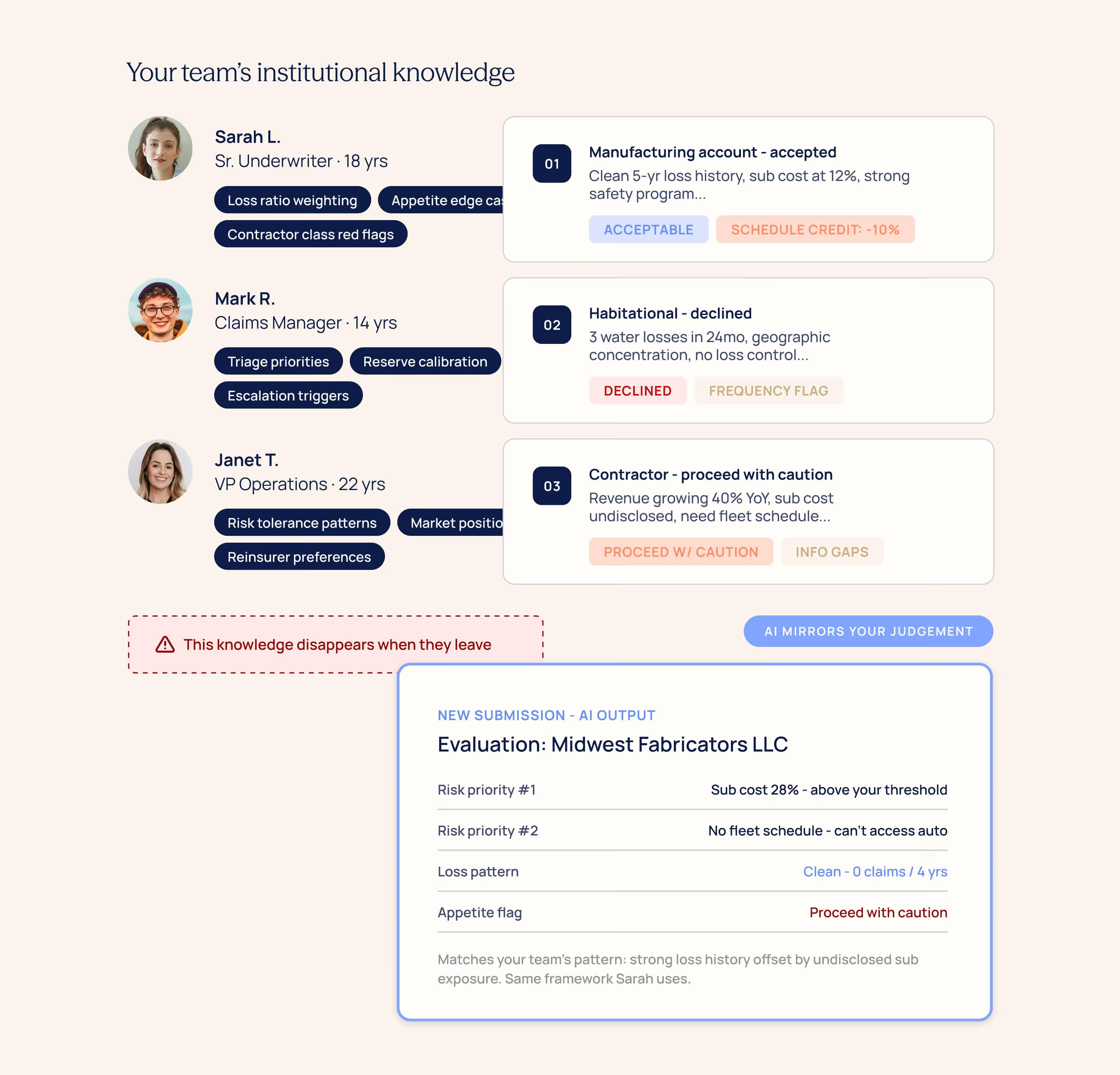
Every carrier has institutional knowledge that lives nowhere except in the heads of senior staff. How your best underwriter evaluates a habitational risk differently from a contractor risk. What your claims team flags versus what they let pass. The judgment calls that take years to develop — and that disappear when someone retires, transfers, or is simply too busy to review every file.
Why it matters for insurance
Few-shot prompting solves this by encoding your team’s actual decision-making into the prompt. Instead of giving AI generic instructions, you paste 2–3 examplesof real decisions your team has made — risk assessments, coverage analyses,triage calls. AI infers the patterns: what your team emphasizes, what theydeprioritize, how they handle edge cases. Things you’d struggle to write as formalrules. This is how you turn AI into a tool that compounds institutional knowledge instead of replacing it with generic averages.
The formula
“Below are [N] examples of how our team evaluates [risk type / claim type]. Study the factors we prioritize, the concerns we flag, and how we weigh trade-offs.
Then evaluate the new submission below using the same judgment framework.”
Prompt - Risk evaluation using your team’s judgment
You are a senior commercial lines underwriter. Below are two examples of how our teamevaluates mid-market accounts. Study the risk factors we prioritize, the concerns we flag,and how we weigh loss history against operations exposure.
--- EXAMPLE 1 ---
[Paste a real risk assessment or file narrative]
--- EXAMPLE 2 ---
[Paste a second example]
--- NEW SUBMISSION ---
[Paste submission]
Evaluate this account using the same judgment framework, risk priorities, and level of detail as the examples. Flag anything requiring additional information.
✓ What this produces
A risk assessment that reflects your team’s actual judgment — not generic insuranceanalysis. Your appetite, your risk tolerance, your way of weighing trade-offs. Captured permanently and available to every team member.
Both prompts for this technique are in the Prompt library at the end of this ebook →
EasySend tip
Take your last 3 best file narratives, risk assessments, or coverage analyses.Paste them into a shared doc. Label what makes each one good. That’s yourteam’s AI calibration set — and it gets smarter every time someone adds a strongexample. When senior staff retire, their judgment stays.
5. Constraint-based prompting | Build the fence before you open the gate
Explicit constraints stop AI from guessing, drifting, and stating things it cannot verify
Useful for:
- Compliance review
- Coverage letters
- Regulated communications
- Risk flags
The principle
AI is designed to be helpful—which means it will fill any gap in your instructionswith a plausible-sounding answer, whether or not it can actually verify thatanswer. In insurance, where a coverage statement carries legal weight and aregulatory citation needs to be accurate, this is a serious problem.Constraint-based prompting adds an explicit list of rules directly into the prompt:what AI must include, what it must not do, how to handle uncertainty, whatregulatory framework applies. Constraints transform AI from a creative systeminto a reliable operational tool.
The most important constraint in insurance AI
Critical guardrail for all high-stakes prompts
Add this to any prompt with legal or financial consequences: "If you are notcertain of a fact, state it as uncertain rather than presenting it as established. Donot generate confident-sounding outputs about things you cannot verify." Thissingle instruction is the difference between AI as a reliable tool and AI as a liability.
Prompt - Compliance review with hard guardrails
You are a licensed insurance compliance analyst. Review the policy language below forpotential compliance issues.
Constraints— follow these exactly:
- Apply regulations from [STATE] only. Do not reference other states' rules.
- If uncertain whether language conflicts with a regulation: flag it as UNCERTAIN—do notspeculate or infer.
- Do not provide legal conclusions—identify issues for counsel review only.
- Do not summarize compliant sections—flag non-compliant language only.
- If you cannot identify the applicable regulation by citation: say so explicitly and stop. Donot invent statutory references.
Return findings as a numbered list.
Each item must include:
- (a) The specific language in question (quoted directly)
- (b) The regulation or statute potentially implicated (citation if known)
- (c) A briefexplanation of the concern(
- d) Confidence level: HIGH / MEDIUM / UNCERTAIN
✓ Why the UNCERTAIN flag matters
Without this constraint, AI states regulatory citations it cannot actually verify. The flagforces it to be honest about its limits—exactly what you need when the output may end upbefore a regulator or in a compliance file.
Both prompts for this technique are in the Prompt library at the end of this ebook →
EasySend tip
Constraints stack with other techniques. The most powerful prompts combinerole-framing (Technique 01) with explicit constraints (Technique 05). The roleactivates the right expertise. The constraints prevent drift and speculation. Usethem together on any high-stakes document.
6. Document transformation | Turn document chaos into structured data
Your messiest PDFs just met their match.
Useful for:
- Loss runs
- ACORD applications
- Adjuster notes
- Broker submissions
- Endorsements
The principle
Document transformation uses AI to convert the unstructured, inconsistent documents that flow through your operations every day—broker emails, scanned applications, multi-page loss runs, field adjuster notes—into clean, structured, actionable data.
The key distinction from basic summarization is intent. You are not asking AI to understand a document—you are asking it to reshape it. Take this messy input and give me this specific output structure. When you are precise about the structure you want, AI can extract and normalize data from almost any document type, regardless of its original formatting.
Why it matters for insurance
For regional carriers running intake on PDFs and email, this technique alone can recover hours of manual data entry per week. The combination of document transformation and structured output prompting (Technique 02) is the single most efficient pairing in this playbook.
Prompt - ACORD 125 application to structured data
You are an insurance data extraction specialist. I am pasting the text of a commercial insurance application (ACORD 125 or broker-formatted equivalent). Extract the fields below and return as a two-column table: Field | Value.
Extract:
- Named insured and DBA
- Mailing address and primary operating location
- FEIN (Federal Employer ID)
- SIC or NAICS code (if stated)
- Years in business
- Business description (verbatim from the application)
- Ownership structure (LLC, Corp, Partnership, etc.)
- Annual gross revenue
- Full-time / Part-time employees
- All coverage lines requested
- Requested policy period (effective and expiration dates)
- Current carrier, expiring premium, and expiration date
- Prior losses mentioned (dates, amounts, brief description)
- Applicant signature date (if present)
Rules:
- NOT PROVIDED — for any field not mentioned
- UNCLEAR — [describe] for any field present but ambiguous
- Do not infer or estimate values
Note: text may include OCR artifacts—normalize as you extract
✓ The time math
Manual entry of a complete ACORD 125 takes 8–15 minutes. This prompt does it in under 60 seconds. A team processing 20 applications per week recovers 3–5 hours every week from this prompt alone.
Both prompts for this technique are in the Prompt library at the end of this ebook →
EasySend tip
When pasting scanned PDF text, add: Note: extracted via OCR, may contain errors. Normalize formatting as you extract, and flag values you cannot confidently interpret. AI handles messy OCR far better than most people expect—but the instruction removes ambiguity about how to treat uncertain characters.
7. Workflow decomposition | Break the big task. Win every step.
One prompt is almost never the answer for complex insurance work.
Useful for:
- End-to-end underwriting
- Claims investigation
- Renewal workflows
- Submission assembly
The principle
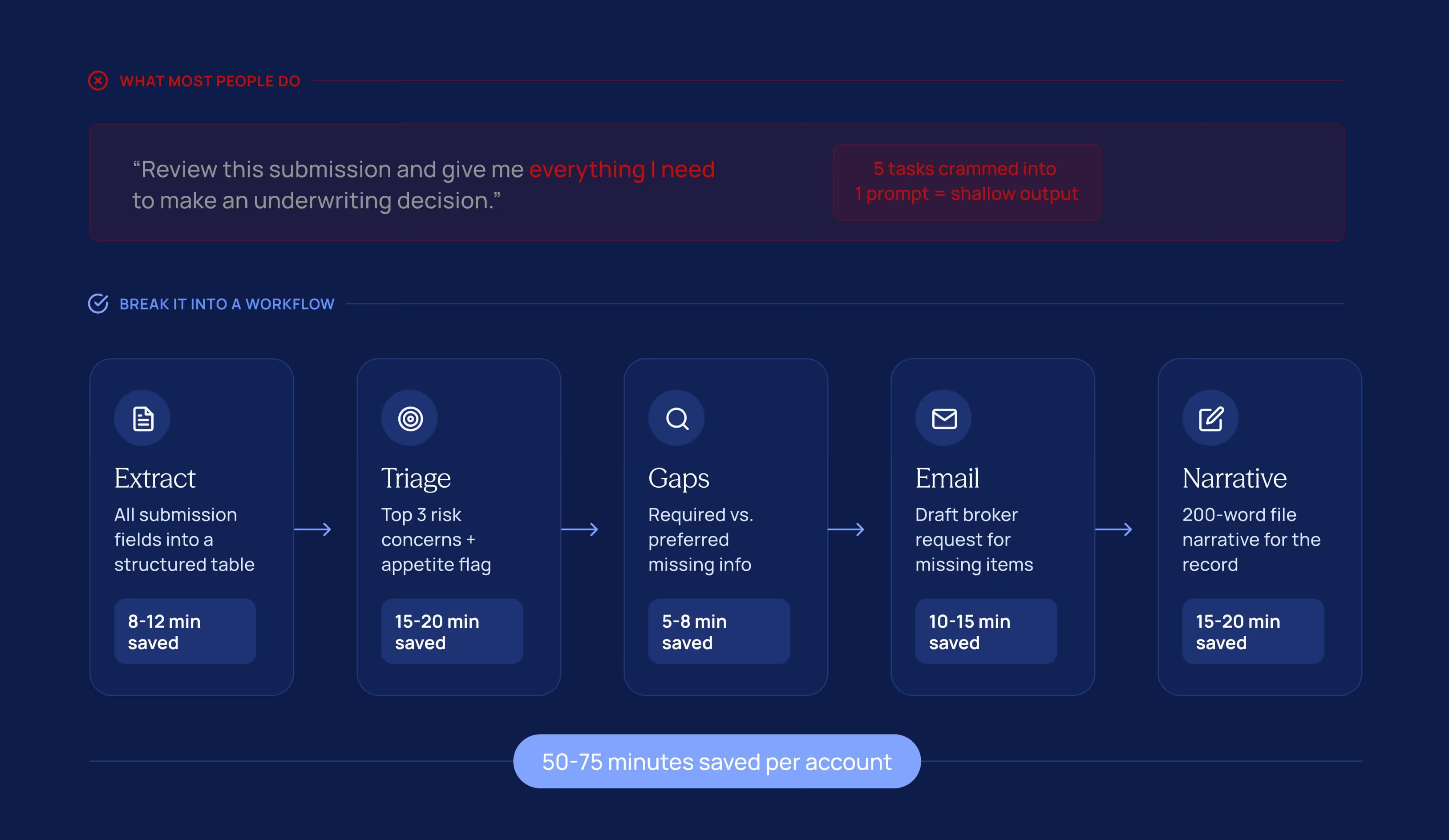
The most common prompting mistake: asking AI to do too much in a single request. “Review this submission and give me everything I need to make an underwriting decision” is five different cognitive tasks collapsed into one prompt.
The output reflects that—compressed, shallow, and often missing critical steps.
Workflow decomposition breaks a complex process into discrete steps, each handled by a separate focused prompt. The output of each step feeds into the next. Every AI call has one clear job—and quality compounds across the chain.
Why it matters for insurance
Insurance workflows are inherently multi-step. Underwriting a new account involves intake, triage, gap analysis, communication, and documentation—each a distinct task with its own output format and purpose. Mapping AI to each step individually produces dramatically better results than asking for everything at once.
The 5-step underwriting workflow
Prompt - Information gap analysis (step 3 of 5)
You are a commercial lines underwriter. I have already completed two prior steps:
Step 1 output (extracted submission data): [PASTE STEP 1 TABLE]
Step 2 output (identified risk concerns): [PASTE STEP 2 OUTPUT]
For THIS STEP ONLY — produce an information gap list. For each missing item, specify:
- What information is needed (be specific, not generic)
- Why it is relevant to underwriting this specific risk
- Classification: REQUIRED (cannot quote without) or PREFERRED (improves our assessment)
- Suggested source: broker / applicant / third-party / inspection
Return as a numbered list. Do not repeat information already in the Step 1 submission data.
✓ Why decompose instead of one big prompt
Each step gets AI's full focus. Triage in Step 2 is sharper because AI isn't simultaneously writing a letter. The letter in Step 4 is better because it's built on the structured gap list from Step 3. Quality compounds.
Both prompts for this technique are in the Prompt library at the end of this ebook →
EasySend tip
Build a workflow doc for your team's top 3 processes. List each step, its prompt, and where to paste the prior step's output. Store it somewhere accessible. New staff can follow it from day one—and it improves every time someone refines a step.
8. Iterative refinement | Make AI critique itself
Good is the enemy of excellent. The first draft is just the starting point.
Useful for:
- Quality control
- High-stakes communications
- File narratives
- Document review
The principle
The most effective AI users don't treat a prompt as a one-shot transaction. They treat the first output as a draft—and then use AI itself to critique, improve, and refine it. This technique takes outputs from competent to excellent, and it's simpler than it sounds.
There are two variants. Human-guided: you review the output, identify what's missing, and issue a targeted follow-up. AI-evaluates-AI: the first output goes into a second prompt that plays the role of a senior reviewer, scores it against defined criteria, and rewrites the weak sections. The second pass is almost always materially better.
When to use it
For everyday outputs—routine acknowledgments, standard broker emails—one prompt is usually enough. For high-stakes documents—reservation of rights letters, coverage position letters, large loss narratives, reinsurance submissions—two passes should be standard practice, not an exception.
Prompt - The AI-reviews-AI pattern
PASS A — Generate the first draft:
You are a senior commercial lines underwriter. Write a 300-word underwriting narrative for the account described below. Include: account overview, key risk factors, appetite assessment, recommended terms.
——— Run Pass A. Copy the output. Then run Pass B. ———
PASS B — Critical review and rewrite:
You are a chief underwriting officer reviewing a junior underwriter's file narrative. Your job is to evaluate it and improve it.
Evaluate against these criteria:
Does it identify all material risk factors for this class of business?
Is the appetite assessment clearly stated with supporting reasoning?
Are the recommended terms specific enough to act on?
Is the language appropriate for a professional underwriting file?
Is anything material missing, understated, or vague?
For each criterion: rate STRONG / ADEQUATE / NEEDS IMPROVEMENT. Rewrite every section rated NEEDS IMPROVEMENT.
Narrative to review: [PASTE PASS A OUTPUT HERE]
✓ Why two passes outperform one
Pass B activates a different reasoning mode—critical rather than generative. The output is almost always materially better, often catching gaps that seem obvious in hindsight but were invisible in the first pass.
Both prompts for this technique are in the Prompt library at the end of this ebook →
For high-stakes documents—always two passes
Reservation of rights letters, coverage position letters, large loss summaries, and declination notices should always go through at least two AI passes as standard practice. It adds 5 minutes and significantly reduces the risk of omissions in documents that may be reviewed by counsel, reinsurers, or regulators.
From solo tricks to team-wide advantage
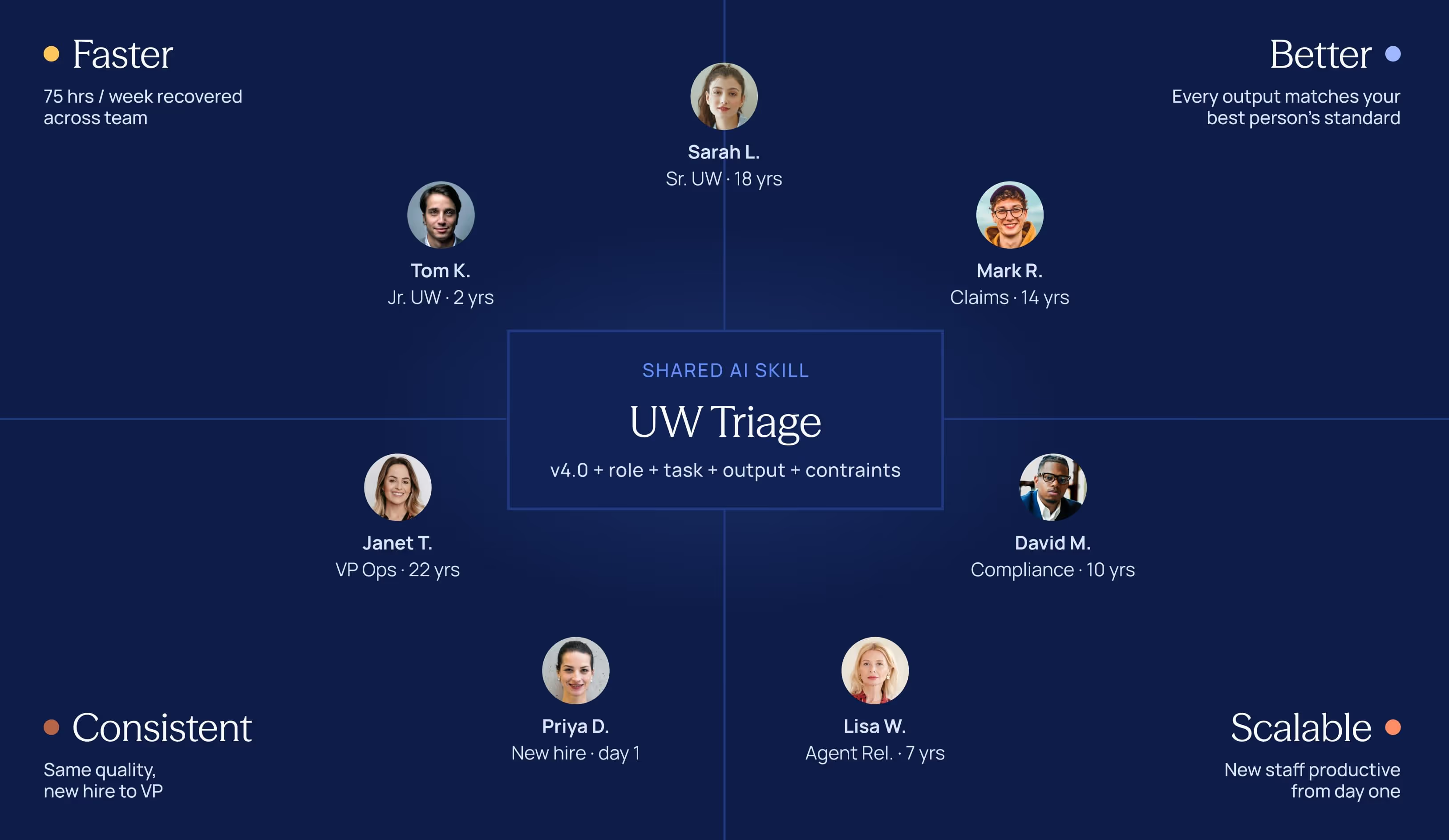
One person using these techniques saves 45 minutes a day. Ten people using them saves 75 hours a week.
The difference is whether your best prompts are shared or siloed.
Why individual AI usage plateaus
When employees write their own prompts from scratch every day—for the same recurring tasks—three things happen. Quality varies based on individual skill. Institutional knowledge isn't captured or transferred. And efficiency gains don't compound because better prompts don't spread across the team.
The solution is simple: treat your best prompts the same way you treat your best templates and standard operating procedures. Document them, refine them, and make them available to everyone.
What an AI “skill” looks like
An AI skill is a documented, reusable prompt template for a specific recurring task. Each one contains:
- A defined professional role (Technique 01)
- A clear task with structured output requirements (Techniques 02 and 05)
- Example outputs where relevant (Technique 04)
- Placeholder variables for each use: [PASTE BROKER EMAIL HERE], [STATE], etc.
- A version number and owner—one person accountable for keeping it current
Your starter skill library
How to roll it out in 4 steps
- Pick the 3 tasks your team does most often and finds most time-consuming. Build a prompt for each. Test on 5 real examples. Refine until it’s 90%+ usable without editing.
- Store all prompts in one shared location—a Notion page, SharePoint folder, or pinned Teams message. The delivery mechanism matters less than the discipline of sharing consistently.
- Assign a prompt owner for each skill: one person who tests it monthly, collects feedback, and updates it when workflows change.
- Review and expand the library quarterly. Add new skills as the team discovers valuable use cases. Retire ones that no longer fit your processes.
Where AI skills connect to digital workflows
A shared prompt library gets you 80% of the way there. The final 20%—where the biggest sustained gains live—is connecting AI output directly into the digital workflows your team runs on every day.
That's what we build at EasySend: intake forms, submission workflows, claims processes, and agent portals where AI extraction and data routing are built into the flow—not bolted on after the fact. For Tier 4–5 carriers, it's the fastest path from “we’re experimenting with AI” to “AI is embedded in how we actually work,” without replacing your core systems.
The prompt library
All 16 prompts from this playbook in one place. Copy, paste, and customize for your team.
1. Role-framing
Prompt 1A: Underwriting triage
You are a senior commercial lines underwriter with 12 years of experience at a regional P&C carrier. You specialize in small-to-mid-market accounts across manufacturing, habitational, and contractor classes.
Review the broker submission below and provide:
- The top 3 underwriting concerns—be specific, not generic
- Information gaps that must be resolved before you can quote
- Preliminary appetite flag: Acceptable / Proceed with Caution / Likely Decline with a 2-sentence rationale
Use underwriting terminology. Do not summarize—analyze.
✓ What you get vs. a vague prompt
- Specific flags like subcontractor cost percentage not disclosed—critical for GL rating.
- Appetite language consistent with how your team talks.
- A clear recommended next step.
Prompt 1B: Claims coverage analysis
You are an experienced commercial property claims examiner with deep knowledge of ISO CP forms, including the CP 00 10 Building and Personal Property Coverage Form and the CP 10 30 Causes of Loss Special Form.
Review the claim description and provide:
- Whether the cause of loss is a covered peril under the CP 10 30 Special Form
- Exclusions that may be triggered—and whether each applies to these specific facts
- Policy conditions the insured may have failed to meet
- Preliminary position: Cover / Investigate Further / Potential Denial
Be specific about policy provisions. Do not generalize.
2. Structured output prompting
Prompt 2A: Loss run normalization
You are an insurance data analyst. The text below is from a commercial loss run.
The format may be inconsistent or use non-standard labels.
1. Extract every claim as a table with these exact columns:
Claim # | Date of Loss | Date Reported | Claimant | Line | Cause of Loss | Paid |
Reserve | Total Incurred | Status
2. Provide a summary below the table:
- Total number of claims
- Total incurred (paid + reserve across all claims)
- Any individual claim with total incurred over $25,000 (listed separately)
- Year-by-year claim frequency if the run spans multiple years
Rules:
- MISSING — for any field that is absent or unreadable
- Do not estimate or interpolate any dollar amounts
- Note: text may contain PDF extraction errors—normalize as you extract
✓ Pro tip on OCR
Copy raw text from any PDF loss run—even messy ones—and paste directly. AI handles imperfect OCR source text much better than most people expect.
Prompt 2B: Broker email to structured submission table
You are a commercial lines intake specialist. Extract all relevant submission data from the broker email below and return as a two column table: Field | Value.
Required fields:
- Named insured and DBA (if any)
- FEIN (if provided)
- Primary state of operations
- Description of operations
- Annual gross revenue
- Number of full time / part time employees
- Lines of business requested
- Requested effective date
- Current carrier and expiring premium (if mentioned)
- Loss history summary (if mentioned)
- Broker name and contact information
Rules:
- NOT PROVIDED — for any field not mentioned in the email
- Do not infer, estimate, or fill in any values—extract only
✓ What this eliminates
- Manual data entry from broker emails. A complete structured record in under 60 seconds.
- For a team processing 20 submissions per week: 3–5 hours recovered every week.
3. Chain-of-thought reasoning
Prompt 3A: Step-by-step first-party coverage analysis
You are a senior commercial property claims examiner with expertise in ISO CP forms, including the CP 10 30 Causes of Loss—Special Form. Complete each step fully before moving to the next.
Cause of Loss
- Identify the cause of loss. Is it a covered peril under the CP 10 30 Special Form?
- If it could be characterized multiple ways, address each.
Exclusions
- List every CP 10 30 exclusion that could potentially apply to this loss.
- For each: state specifically whether it applies to these facts and why.
Policy Conditions
- Identify conditions relevant to this claim (prompt notice, cooperation, proof of loss).
- Flag any the insured may have failed to meet.
Coverage Enhancements
- Note endorsements or extensions commonly relevant to this type of loss.
Preliminary Position
- Cover / Investigate Further / Potential Denial.
- State the single most important next investigative step.
✓ Why this beats 'analyze the coverage'
- You get a documented reasoning chain—not just a conclusion.
- Each step can be placed in a file note, reviewed by a supervisor, or used to identify exactly where more investigation is needed.
Prompt 3B: Underwriting risk assessment
You are a commercial lines underwriter evaluating a mid market account. Complete each step before moving to the next.
Account Overview
- Summarize in 3 sentences: who they are, what they do, what coverage they want.
Favorable Factors
- List what makes this account attractive for its class. Be specific.
Risk Concerns
- List concerns in order of severity.
- For each: explain why it matters and what information would help you assess it more accurately.
Information Gaps
- Distinguish:
- (a) must have before quoting vs.
- (b) helpful but not required.
Preliminary Appetite
- Acceptable / Proceed with Caution / Likely Decline.
- Explain your reasoning in 2–3 sentences based on the information provided.
4. Few-shot examples
Prompt 4A: Calibrated risk assessment
You are a senior commercial lines underwriter. Below are two examples of how our team evaluates accounts. Study the risk factors we prioritize, the concerns we flag, and how we weigh trade-offs.
--- EXAMPLE 1 ---
[Paste a real risk assessment from your team]
--- EXAMPLE 2 ---
[Paste a second example with a different risk profile]
--- NEW SUBMISSION ---
[Paste the new submission data]
Evaluate using the same judgment framework. Flag anything requiring additional information.
✓ What this produces
- A risk assessment that reflects your team’s actual judgment — not generic insurance analysis.
- Your appetite, your risk tolerance, your way of weighing trade-offs.
- Captured permanently and available to every team member.
Prompt 4B: Claims triage calibration
You are a senior claims examiner. Below are two examples of how our team triages and prioritizes new claims. Study the factors we weigh, what we escalate, and how we set initial reserves.
--- EXAMPLE 1 ---
[Paste a real claims triage decision from your team]
--- EXAMPLE 2 ---
[Paste a second example with a different claim type]
--- NEW CLAIM ---
[Paste new claim details]
Triage this claim using the same framework and priorities as the examples.
5. Constraint-based prompting
Prompt 5A: Policy compliance check
You are a licensed insurance compliance analyst.
CONSTRAINTS:
- Apply [STATE] regulations only.
- Flag uncertain items as UNCERTAIN.
- No legal conclusions.
- No invented statutory references.
Return findings as numbered list with:
- (a) language quoted
- (b) regulation implicated
- (c) explanation
- (d) confidence: HIGH / MEDIUM / UNCERTAIN
[PASTE POLICY LANGUAGE HERE]
✓ Why the UNCERTAIN flag matters
- Without this constraint, AI states regulatory citations it cannot actually verify.
- The flag forces it to be honest about its limits.
Prompt 5B: Reservation of rights letter
You are a claims professional drafting a reservation of rights letter.
CONSTRAINTS:
- No final coverage determinations.
- Identify provisions requiring investigation.
- Reference provision types by name only.
- Neutral tone.
- Flag [STATE] ROR requirements.
- Max 4 paragraphs.
- End reserving all rights.
Claim summary: [PASTE] | Provisions: [LIST]
6. Document transformation
Prompt 6A: ACORD 125 extraction
You are an insurance data extraction specialist. Extract as two-column table: Field | Value.
Fields:
- Named insured
- address
- FEIN
- SIC/NAICS
- years in business
- description
- ownership
- revenue
- employees
- coverage lines
- policy period
- current carrier
- prior losses
- signature date
Rules:
- NOT PROVIDED / UNCLEAR.
- Do not infer.
- Normalize OCR artifacts.
[PASTE APPLICATION TEXT HERE]
✓ The time math
- Manual entry of a complete ACORD 125 takes 8–15 minutes.
- This prompt does it in under 60 seconds.
A team processing 20 applications per week recovers 3–5 hours every week from this prompt alone.
Prompt 6B: Field notes transformation
You are a claims supervisor reviewing raw adjuster field notes.
Transform into:
- LOSS OVERVIEW (3–4 sentences)
- DAMAGE SUMMARY
- COVERAGE CONSIDERATIONS (flag [NEEDS LEGAL REVIEW])
- INFORMATION GAPS
- RECOMMENDED NEXT STEPS (top 3)
Flag ambiguity as [NEEDS CLARIFICATION].
[PASTE ADJUSTER FIELD NOTES HERE]
7. Workflow decomposition
Prompt 7A: Information gap analysis (Step 3)
You are a commercial lines underwriter.
Step 1 output: [PASTE TABLE] | Step 2 output: [PASTE CONCERNS]
Produce information gap list. For each:
- what’s needed
- why it matters
- REQUIRED vs PREFERRED
- suggested source
Do not repeat Step 1 data.
Prompt 7B: File narrative (Step 5)
You are a senior commercial lines underwriter writing a file narrative (200 words).
Using:
- Step 1 data [PASTE]
- Step 2 concerns [PASTE]
- Step 3 gaps [PASTE]
Include:
- account overview
- risk factors
- outstanding info status
- appetite position
Tone: professional underwriting file language. No filler.
8. Iterative refinement
Prompt 8A: Two-pass narrative
PASS A: You are a senior underwriter. Write 300-word narrative: overview, risk factors, appetite, terms. [PASTE DATA]
--- Run Pass A. Copy output. Run Pass B. ---
PASS B: You are a CUO reviewing this narrative. Rate each: STRONG / ADEQUATE / NEEDS IMPROVEMENT. Rewrite weak sections. [PASTE PASS A OUTPUT]
Prompt 8B: Quick refinements
Targeted follow-ups for any AI output:
- “Too generic. Rewrite for [class], focusing on [risk factor].”
- “Too formal. Rewrite conversational but professional.”
- “Shorten by 30%. Keep substance, cut filler.”
- “Convert to 5-bullet executive summary.”
Conclusion
One prompt, that's where it starts
You don't need a transformation program, a new system, or a data science team. You need one well-designed prompt and the discipline to share what works.
Start smaller than you think you need to
Pick one task from the skill library above—the one your team does most often or finds most painful. Open ChatGPT, Claude, or Gemini. Build a prompt using the techniques in this playbook. Test it on five real examples. Refine it until it's excellent. Share it with your team.
That's where the AI advantage begins. Not in a boardroom strategy session—in a single structured prompt that saves your underwriters 15 minutes on every new submission, or your claims team 20 minutes on every coverage analysis. Then the next prompt. Then the one after that.
The compounding advantage
The insurers who build this discipline now—who treat AI prompting as a professional skill, document what works, and share it systematically—will compound that advantage every quarter. Their teams will have more capacity. Cycle times will shrink. Outputs will be more consistent. And they'll do all of this without large IT projects or transformation budgets.
We wrote this playbook because we work with insurance companies every day and we genuinely want the teams we work with to get more from AI—whether or not they use our product. These techniques work. The prompts are tested. Now they're yours.
About EasySend
EasySend is an AI-powered platform that helps insurance leaders digitize complex customer-facing workflows—from applications and submissions to claims intake, policy servicing, and agent onboarding. EasySend integrates with your existing core systems and eliminates the manual bottlenecks that constrain operational efficiency.
For insurance leaders who need real efficiency gains without multi-year IT projects, EasySend handles complex, multi-step, multi-party workflows—ensuring every piece of data flows seamlessly into your core systems, every time.


.avif)

.avif)


